
You turn off the TV, and instead of a black rectangle staring back at you from the living room wall, you get a Rembrandt. Or a moody coastal photograph. Or your kid’s school portrait, blown up gallery-style. That’s the entire pitch behind the Samsung Art Store, and it’s a stranger, more useful idea than it sounds at first.
A lot of people hear “art store” and assume it’s a gimmick bolted onto a TV to justify a higher price tag. Spend even a little time in the menus, swapping collections and comparing the paid catalog against the free rotation, and it becomes clear there’s more thought behind it than that. The Samsung Art Store is the digital gallery feature built into Samsung’s Frame TV and several newer QLED models, and it’s quietly become one of the more talked-about reasons people choose a samsung art frame tv over a regular flat screen.
This guide walks through what the Samsung Art Store actually does, what the subscription includes, how it compares to other art TV Samsung options, and where it falls short. If you’re trying to decide whether the upgrade is worth it, or you already own a Frame TV and want to use the art features properly, you’re in the right place.
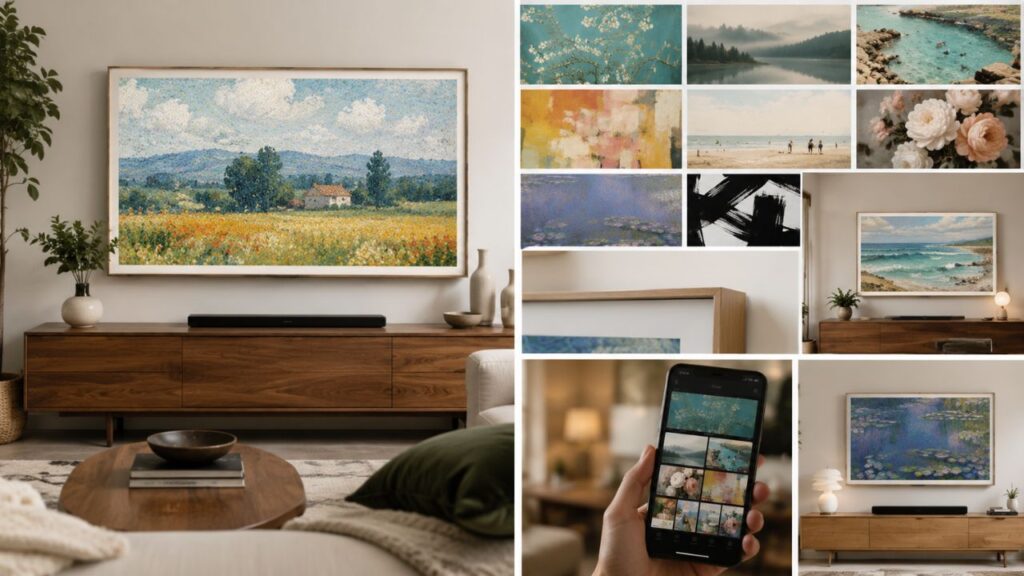
What Is the Samsung Art Store, Exactly?
The Samsung Art Store is a built-in app on Samsung’s Frame TV lineup, and it’s now also available on select 2025 QLED and Neo QLED models. Every samsung art frame tv ships with the app pre-installed, so there’s no extra download or setup step required out of the box. Instead of leaving a dark, lifeless screen in your living room when the TV isn’t in use, the set switches into Art Mode and displays a piece of artwork, almost like a digital frame hanging on the wall.
You access it directly from the TV’s pop-up menu, no second device required, though most people end up managing it through the SmartThings app on their phone at some point. Once you’re in, you can browse thousands of pieces, sorted into curated collections by genre, mood, or artist.
A few things separate this from a basic screensaver:
- The collection includes work tied to recognizable institutions and artists, including pieces associated with The Met, MoMA, and Art Basel
- New artwork gets added on a rolling basis, so the catalog isn’t static
- You can layer in your own photography, not just licensed art
- The display uses a matte-style finish on Frame TV models, which cuts down glare and helps images read more like prints than screens
That last point matters more than people expect. A glossy TV panel showing a painting looks like a TV showing a painting. The matte finish on the Frame line is part of why the illusion actually works.
How Art Mode Differs From a Regular Screensaver
Art Mode isn’t just dimming the screen or running a slideshow in the background. It’s a distinct display state with its own settings, its own motion sensor behavior, and its own brightness calibration meant to mimic ambient gallery lighting. Many Frame TV owners set Art Mode to activate automatically when the room senses no motion for a set period, so the screen never goes fully black during the day.
Frame TV Art: Why the Hardware and the Software Work Together
You can’t really talk about the frame tv art experience without talking about the television it’s designed for. Samsung built the Frame TV specifically to disappear into a room when it’s not playing video, and the art catalog is the half of that equation that gets less attention than the customizable bezels. That’s really the heart of any samsung art tv purchase decision: you’re buying the hardware and the curated content as one package, not two separate products.
The Frame ships in sizes ranging from smaller 32-inch options up through 85-inch Frame Pro models, and Samsung sells magnetic, swappable frame fronts in different finishes, so the whole unit can match your existing furniture instead of looking like an obvious electronics purchase. Pair that physical design with rotating frame tv art on the screen, and from a few feet away, most guests genuinely won’t register it as a television until you turn on a show.
Resolution and Why Your Photos Sometimes Look Cropped
If you’ve uploaded a personal photo and noticed it got cropped strangely, the aspect ratio is almost always the culprit. Frame TVs run a standard 16:9 widescreen ratio at 3840 x 2160 resolution, while most phone photos and DSLR shots are closer to 4:3 or 3:2. Based on Samsung’s own sizing guidance, the safest move is resizing images before upload rather than letting the TV crop them automatically, since the auto-crop tends to cut off the edges of a frame rather than the center.
Samsung Art Store Subscription: What You’re Actually Paying For
This is usually where the decision gets made. The free tier of the Samsung Art Store gives you a rotating selection, commonly cited at around 30 curated pieces delivered monthly, refreshed and chosen by Samsung’s in-house art team. That’s enough for plenty of households who just want something nicer than a blank screen.
The paid samsung art store subscription unlocks the full catalog, which has grown past 5,000 pieces pulled from museums, independent artists, photographers, and design partners. Based on publicly listed pricing, the subscription runs in the neighborhood of five dollars a month, with an annual option that works out cheaper per month if you’re confident you’ll stick with it.
Here’s a simple way to think about what each tier gets you:
| Tier | Access | Best For |
|---|---|---|
| Free rotation | About 30 new pieces monthly, curator-picked | Casual users who don’t want to manage a subscription |
| Paid subscription | Full catalog (5,000+ pieces), choose anything anytime | People who swap art often or want specific artists or themes |
Is the Samsung Art Store Subscription Worth the Money?
In most cases, the answer depends on how often you’d actually change what’s displayed. If you’re someone who’d set one piece and forget it for a year, the free rotation probably covers you fine. If you like switching things up by season, mood, or room redecoration, the subscription pays for itself fast just in the time you’d otherwise spend hunting for free alternatives.
Choosing the Right Samsung Art TV for Your Room
Not every samsung art tv model behaves identically, and size matters more here than with a typical television purchase. A Frame TV that’s too large for a wall can make even great frame tv art look more like a billboard than a painting, while one that’s too small gets lost. Shopping for a samsung art frame tv also means thinking about wall space the way an interior designer would, not the way most people shop for electronics.
A few practical guidelines worth considering before buying:
- Measure the wall space the way you would for a piece of framed art, not just for screen size
- Sit at your normal viewing distance and judge whether the proportions feel like art or feel like a TV
- Check which finishes are available for your chosen size, since not every frame color ships for every screen size
- Confirm whether the model supports the full Art Store catalog, since some non-Frame QLED sets only support the free Art Store Streams rotation rather than the full subscription catalog
There’s no single best art tv samsung model for every household, since the right pick depends as much on wall space and lighting as it does on screen size or budget.
Getting More Out of Your Samsung Art Store Subscription Day to Day
Once you’ve committed to a samsung art store subscription, the real value comes from actually using the tools instead of picking one painting and never touching the settings again.
Building Your Own Slideshow Collections
You can mix licensed art with your own photography inside the same rotating playlist. A lot of Frame TV owners build seasonal collections, switching to warmer tones and family photos around the holidays, then back to landscape or abstract work the rest of the year.
Matching Art to Your Lighting
Art Mode includes brightness and color matching that adjusts based on ambient light in the room, similar to how a gallery would light a piece differently depending on time of day. It’s a small detail, but it’s the difference between a painting that looks flat at noon and one that still reads correctly at night.
Samsung Art Store vs. Other Art TV Samsung Alternatives
Samsung isn’t the only company chasing the art-television idea, and it helps to know where the art tv samsung ecosystem sits relative to competitors before you commit.
Third-party companies sell aftermarket frames designed specifically to fit Samsung’s Frame TV, along with their own supplemental art libraries, often with hundreds of additional pieces you can download manually. These tend to appeal to people who want more frame style options than Samsung currently offers. On the flip side, dedicated digital art frames from smaller companies focus purely on art display without doubling as a television, which works for people who never wanted the TV functionality in the first place.
The advantage Samsung holds is integration. You’re not juggling a separate app, a separate subscription, and a separate piece of hardware. It lives inside the TV you already own, tied to the same account and remote you use for everything else, which is really the whole appeal of owning a samsung art tv instead of pairing a regular set with a third-party gadget.
Where a Samsung Art TV Setup Fits Best in Your Home
Not every wall is going to do the display justice, and that’s worth thinking through before you mount anything. The room a Frame TV ends up in usually matters more to the final look than which collection you choose to display.
Lighting Conditions That Help or Hurt the Illusion
Direct sunlight hitting the panel for several hours a day washes out the ambient color matching that makes the art look natural, and it can also accelerate glare on the matte coating over time. Rooms with indirect natural light, or light you can control with curtains and dimmable fixtures, tend to show off the art catalog far better than a sun-drenched window wall. Based on how Samsung designed the ambient light sensor, the display is meant to adjust brightness gradually throughout the day rather than snap between settings, so steadier lighting in the room gives that feature room to actually do its job.
Matching Frame Finishes to Existing Decor
The swappable bezel options exist for a reason beyond aesthetics. A walnut or oak finish reads differently against white walls than it does against darker, more saturated paint, and the wrong pairing can make even a great piece of frame tv art look slightly off, the way a mismatched picture frame would in a normal gallery wall. Bring a paint chip or a photo of the wall when you’re choosing a finish in store, since lighting in a showroom rarely matches lighting at home.
Room Type Considerations
A few patterns show up consistently among people who’ve lived with these displays for a while:
- Living rooms and entryways tend to get the most daily value, since they’re seen constantly and by guests
- Home offices benefit from calmer, less visually busy collections that don’t compete with focus during work hours
- Bedrooms work well with dimmer, warmer palettes, especially if Art Mode stays active overnight
- Open-concept spaces often do better with neutral or landscape-heavy collections that don’t clash with sightlines from the kitchen or dining area
None of this means there’s one correct setup. It just means a little planning around lighting and room function goes further than picking art tv samsung models based on screen size alone.
Common Issues Frame TV Owners Run Into
Even a well-set-up samsung art frame tv has friction points, and most of them are fixable once you know where to look. Most complaints trace back to a handful of fixable settings rather than rotating frame tv art images that genuinely fail to load.
- Art Mode won’t activate on schedule: Usually a motion sensor sensitivity setting buried in the Art Mode menu, not a hardware fault
- Uploaded photos look stretched: Almost always a resolution or aspect ratio mismatch, fixed by resizing before upload
- Subscription content not appearing on a second TV: The Art Store subscription is generally tied to your Samsung account, so confirm you’re signed into the same account on both sets
- Colors look washed out compared to the source photo: Ambient light compensation may be overcorrecting; switching to a fixed brightness setting often helps
Frequently Asked Questions
Does the Samsung Art Store work on TVs other than the Frame?
Yes, in a limited way. Several 2025 Samsung QLED and Neo QLED models include access to the free Art Store Streams rotation, though the full paid catalog and the matte, art-like finish remain specific to the Frame and Frame Pro lines.
Can I cancel the subscription and keep the art I already added?
Once a subscription lapses, access to the premium catalog pieces typically reverts to the free rotation, so any premium artwork you had displayed will no longer be available to select. Photos you uploaded yourself, since they aren’t part of the paid catalog, generally stay accessible regardless of subscription status.
How often does new artwork get added to the catalog?
Samsung refreshes the Art Store on a rolling basis, with new curated pieces and themed collections showing up regularly throughout the year, often tied to seasons, exhibitions, or partnerships with galleries and artists.
Does displaying art constantly hurt the TV’s panel over time?
This is a common worry, and in most cases it’s a smaller concern than people assume on modern QLED panels, which Samsung designs with this kind of extended static-image use in mind. That said, varying the displayed piece rather than leaving one image fixed for months at a time is a reasonable habit either way.
Can multiple family members have different art preferences saved?
The TV itself doesn’t separate viewing history by individual user the way a streaming app might, but you can build and save multiple custom playlists or collections, so different rooms or different moods can pull from different saved groups.
Is there a way to preview art before subscribing?
Yes. The free rotation gives you a real sense of the image quality and style variety before you commit to a subscription, and many of the curated collections in the paid catalog show preview thumbnails even if the full-resolution version requires the subscription to display.
Does the Art Store use a lot of internet data or electricity?
Streaming a static art image uses minimal data once it’s loaded, comparable to loading a single high-resolution photo, and power draw in Art Mode is generally lower than active video playback since there’s no continuous video decoding happening.
Can I use a USB drive instead of an internet connection?
Yes. You can load personal photos onto a USB device and connect it through the One Connect box, which works even without an active internet connection, though browsing or purchasing from the subscription catalog itself does require Wi-Fi.
Final Thoughts
The Samsung Art Store turns a genuine drawback of modern televisions, that dead black rectangle dominating a room, into something closer to an asset. Whether the subscription makes sense really comes down to how much you value variety versus how content you’d be with a curated free rotation that changes on its own each month. Neither choice is wrong; they just suit different habits.
What stands out once you spend real time with it is how the small details add up: the matte finish, the ambient light matching, the option to blend your own photography with museum-grade pieces. None of those individually sound impressive on a spec sheet, but together they’re why so many Frame TV owners stop thinking of the art feature as a bonus and start treating it as the main reason they bought the television in the first place. This guide should help any samsung art frame tv owner get more out of that experience, whether you’re still deciding or already three collections deep.
If you’re on the fence, spend a week with the free rotation before paying for anything. Pay attention to how often you actually want to change what’s on the wall, and let that habit, not the marketing, decide whether the subscription earns a permanent spot in your monthly budget.